# Order API
## **Order List APIs**
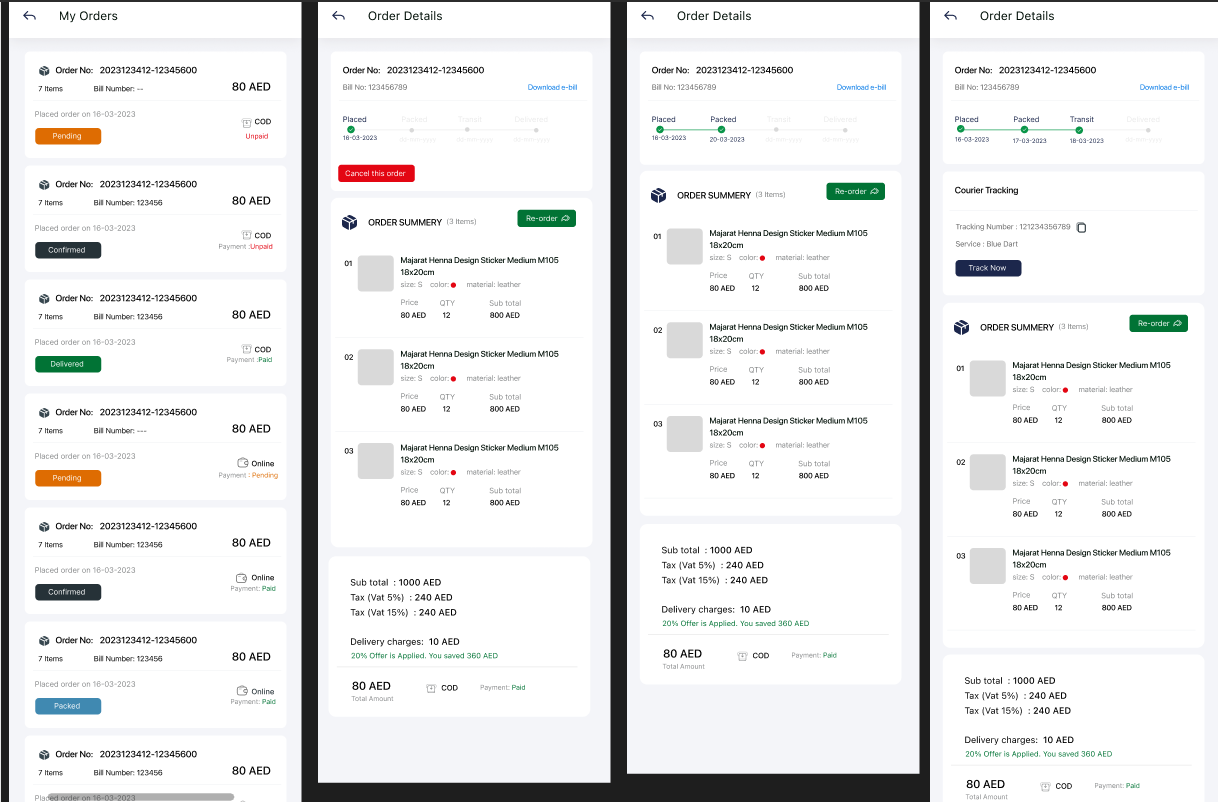
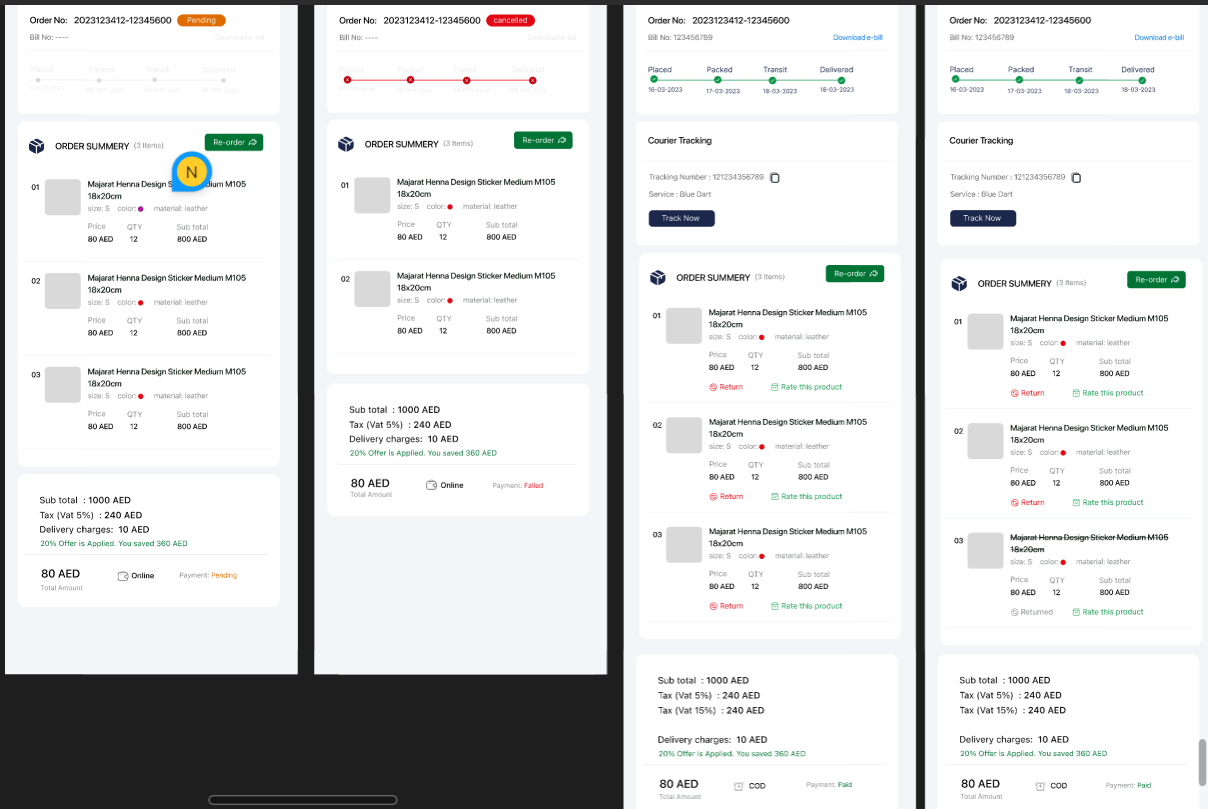
The Order APIs enable users to manage their orders effectively on the e-commerce platform. These APIs provide essential functionalities, such as viewing order details, tracking orders, accessing e-bills, canceling orders, and initiating returns.
Order listing and detail
Include return and cancellation screens
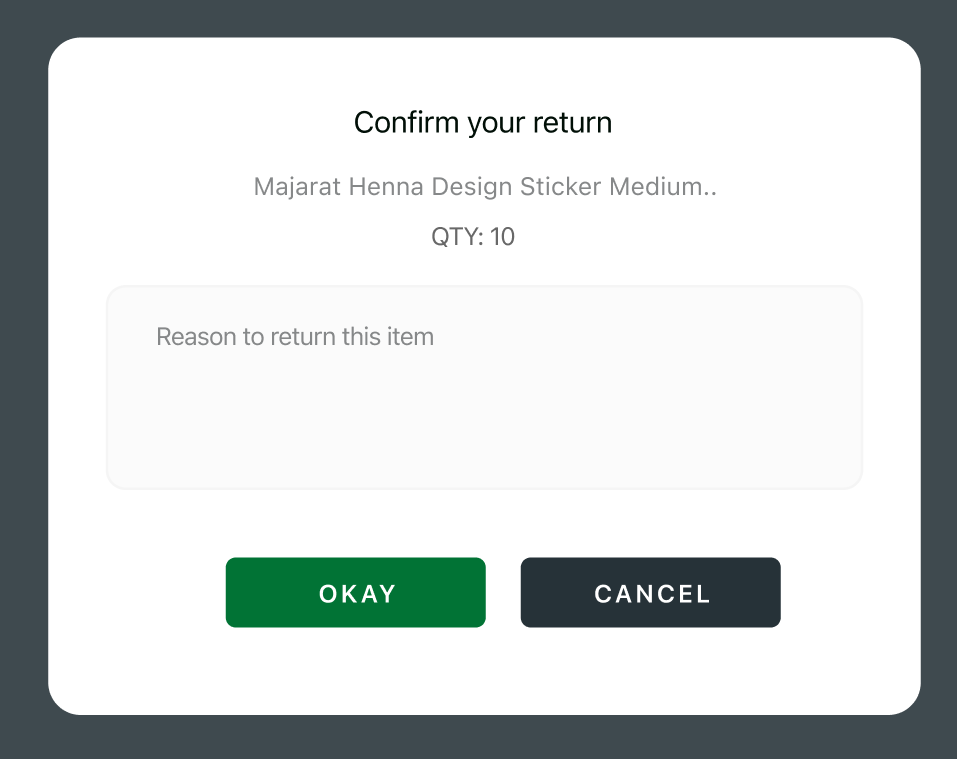
Return reason interface
#### **Order Statuses:**
1. **Pending:** The order is placed and awaiting processing.
2. **Confirmed:** The order has been confirmed by the system and is being processed.
3. **Packed:** The order items have been packed and are ready for shipping.
4. **Transit / Shipped:** The order is in transit and on its way to the delivery address.
5. **Delivered:** The order has been successfully delivered to the customer.
6. **Cancelled:** The order has been cancelled either by the customer or the system.
###
###
### **1. My Orders API**
The My Orders API retrieves a list of all orders placed by the authenticated user.
### **Endpoint**
* `{{baseurl}}/api/v1/customer/my-orders`
### **Method**
* **GET**
### **Request Parameters:**
* `page` (optional): The page number for paginated results. If not specified, the first page of orders will be returned.
### **Request Body:**
None
### **Authorization:**
The API requires a bearer token in the request header for authentication. Users must include their valid bearer token in the "Authorization" header of the HTTP request to access their orders.
### **Response Format:**
The API responds with a JSON object containing an array of order objects representing the user's orders.
```json
{
"success": true,
"data": {
"orders": [
{
"id": 95,
"order_code": "20230807-11315249O",
"bill_no": "MAJ-2023-08-0006",
"number_of_products": 1,
"total_amount": 120,
"order_date": "2023-08-07T06:01:52.000000Z",
"order_status": "confirmed",
"payment_status": "paid",
"payment_type": "stripe",
"delivery_date":"2023-08-05T12:09:03.000000Z",
"delivery_day":"Friday",
"delivery_delay_status:"On-Time"
},
{
"id": 91,
"order_code": "20230805-17390348C",
"bill_no": "MAJ-2023-08-0003",
"number_of_products": 1,
"total_amount": 120,
"order_date": "2023-08-05T12:09:03.000000Z",
"order_status": "delivered",
"payment_status": "paid",
"payment_type": "cod"
"delivery_date":"2023-08-05T12:09:03.000000Z",
"delivery_day":"Friday",
"delivery_delay_status:"On-Time"
}
],
"pagination": {
"total": 24,
"count": 15,
"limit": 15,
"current_page": 1,
"total_pages": 2
}
},
"message": "Success",
"status_code": 200
}
```
### **Features:**
* The My Orders API allows users to retrieve a list of all orders they have placed.
* Users can access order details, such as order ID, order code, order number, bill number, order date, order status, total amount, shipping address, and payment method.
### **Usage:**
* The My Orders API is used when users want to view their order history or track the status of their orders.
###
###
###
### **2. Order Tracking API**
The Order Tracking API provides real-time tracking information for a specific order.
### **Endpoint**
* `{{baseurl}}/api/v1/customer/order-tracking/:order_id`
### **Method**
* **GET**
### **Request Parameters:**
* `order_id`: The unique identifier of the order to track.
### **Request Body:**
None
### **Authorization:**
The API requires a bearer token in the request header for authentication. Users must include their valid bearer token in the "Authorization" header of the HTTP request to track an order.
### **Response Format:**
The API responds with a JSON object containing the tracking details of the specified order.
```json
{
"success": true,
"data": {
"order": [
{
"id": 41,
"order_code": "20230720-10455243O",
"bill_no": "MAJ-2023-07-0151",
"order_placed_date": "07-08-2023",
"order_placed_status": "pending",
"payment_status": "paid",
"payment_type": "online",
"order_packed_date": "07-08-2023",
"order_packed_status": "packed",
"order_shipped_date": "07-08-2023",
"order_shipped_status": "shipped",
"courier_name": "express",
"courier_tracking_no": "6541661",
"courier_tracking_url": "https://www.track.com",
"delivery_date":"2023-08-05T12:09:03.000000Z",
"delivery_day":"Friday",
"delivery_delay_status:"On Time"
}
]
},
"message": "Success",
"status_code": 200
}
```
### **Features:**
* The Order Tracking API provides real-time tracking information for a specific order.
* Users can view the tracking number, carrier, and tracking URL for the order.
### **Usage:**
* The Order Tracking API is used when users want to monitor the delivery status and location of their orders.
###
###
###
### **3. E-bill API**
The E-bill API allows users to access electronic bills (e-bills) for a specific order.
### **Endpoint**
* `{{baseurl}}/api/v1/customer/e-bill/:order_id`
### **Method**
* **GET**
### **Request Parameters:**
* `order_id`: The unique identifier of the order for which to retrieve the e-bill.
### **Request Body:**
None
### **Authorization:**
The API requires a bearer token in the request header for authentication. Users must include their valid bearer token in the "Authorization" header of the HTTP request to access the e-bill.
### **Response Format:**
The API responds with a JSON object containing the e-bill details for the specified order.
```json
{
"success": true,
"message": "E-bill has been generated",
"pdf_url": "https://majarat-developemt.s3.ap-southeast-1.wasabisys.com/uploads/order_invoices/order-20230720-10455243O.pdf",
"data": []
}
```
## **Features:**
* The E-bill API allows users to access electronic bills (e-bills) for a specific order.
* Users can view the e-bill URL and download the e-bill for their records.
### **Usage:**
* The E-bill API is used when users want to view and download electronic bills associated with their orders.
###
###
###
### **4. Order Summary API**
The Order Summary API provides a detailed summary of a specific order.
### **Endpoint**
* `{{baseurl}}/api/v1/customer/order-summery/:order_id`
### **Method**
* **GET**
### **Request Parameters:**
* `order_id`: The unique identifier of the order for which to retrieve the summary. In this case, the order ID is 57.
* `lang_code` (optional): The language code used to retrieve product name and details in a specific language. If not provided, the default language will be used.
### **Request Body:**
none
### **Authorization:**
The API requires a bearer token in the request header for authentication. Users must include their valid bearer token in the "Authorization" header of the HTTP request to access the order summary.
### **Response Format:**
The API responds with a JSON object containing the detailed order summary.
```json
{
"success": true,
"data": {
"order": [
{
"id": 57,
"order_code": "20230724-10415772C",
"bill_no": "MAJ-2023-07-0170",
"payment_status": "paid",
"payment_type": "cod",
"sub_total": 216,
"total_amount": 316,
"total_tax": 29.8,
"split_tax": [
{
"key": "CGST",
"percentage": "8.00%",
"value": "14.90"
},
{
"key": "SGST",
"percentage": "8.00%",
"value": "14.90"
}
],
"delivery_charge": 100,
"discount_rate": 0,
"discount_percentage": 0,
"order_details": [
{
"serial": 1,
"order_items_id": 112,
"product_id": 1,
"product": {
"thumbnail": "https://majarat-developemt.s3.ap-southeast-1.wasabisys.com/uploads/all/71srbo5I7VL._SL1500_.jpg",
"name": "NETPLAY Zip-Front Puffer Jacket with Insert Pockets with premium colour of which has high quality",
"variations": [
{
"attribute": "Size",
"attribute_value": "SMALL",
"attribute_code": null
},
{
"attribute": "Colour",
"attribute_value": "BLACK",
"attribute_code": "#000000"
}
],
"is_returned": 1
},
"quantity": 3,
"mrp": "100.00",
"offer_price": "90.00",
"total_price": "270.00"
}
]
}
]
},
"message": "Success",
"status_code": 200
}
```
### **Features:**
* The Order Summary API provides a detailed summary of a specific order, including individual item details.
* Users can access information such as the order ID, order number, order date, order status, total amount, item details, subtotal, tax amount, discount amount, and grand total.
### **Usage:**
* The Order Summary API is used when users want to view a comprehensive breakdown of their order, including individual item details and pricing.
###
###
###
### **5. Order Cancellation API**
The Order Cancellation API allows users to cancel a specific order.
### **Order Cancellation:**
* Order cancellation is allowed only for orders with Cash on Delivery (COD) as the payment method.
* Cancellation can be requested before the order status changes to "Packed".
* For online orders, cancellation is not available, and customers can initiate a return request instead.
### **Endpoint**
* `{{baseurl}}/api/v1/customer/order-cancel/:order_id`
### **Method**
* **GET**
### **Request Parameters:**
* `order_id`: The unique identifier of the order to be canceled.
### **Request Body:**
None
### **Authorization:**
The API requires a bearer token in the request header for authentication. Users must include their valid bearer token in the "Authorization" header of the HTTP request to cancel an order.
### **Response Format:**
The API responds with a JSON object confirming the order cancellation.
```json
{
"success": true,
"message": "Order has been cancelled",
"status": 200,
"data": []
}
```
### **Features:**
* The Order Cancellation API allows users to cancel a specific order.
* Users receive a confirmation message indicating the successful cancellation of the order.
### **Usage:**
* The Order Cancellation API is used when users want to cancel an order they no longer wish to proceed with.
###
###
###
### **6. Order Return API**
The Order Return API enables users to initiate a return request for specific items within an order.
### **Order Return:**
* Return requests can be initiated for both COD and online orders.
* Customers can initiate a return request for items within an order.
* Returns can be requested for various reasons, such as damaged items, defective products, or dissatisfaction with the product.
Please note that these policies aim to strike a balance between customer convenience and order management efficiency. By allowing cancellations only for COD orders before they are packed, it helps avoid unnecessary cancellations for orders that are already in the advanced stages of processing or shipping. For online orders, the focus shifts to the return process, where customers have the option to request returns for various reasons after the product is delivered.
### **Endpoint**
* `{{baseurl}}/api/v1/customer/order/return`
### **Method**
* `POST`
### **Request Parameters:**
None
### **Request Body:**
The request body should include the following parameters:
* `order_id`: The unique identifier of the order for which the return is requested.
* `order_items_id`: An array containing the IDs of the items to be returned.
* `return_reason`: The reason for initiating the return.
```json
{
"order_id": 57,
"order_items_id": [101, 102],
"return_reason": "Damaged items"
}
```
### **Authorization:**
The API requires a bearer token in the request header for authentication. Users must include their valid bearer token in the "Authorization" header of the HTTP request to initiate a return.
### **Response Format:**
The API responds with a JSON object confirming the return request.
```json
{
"success": true,
"message": "Order return initiated successfully",
"status_code": 200,
"data": []
}
```
### **Features:**
* The Order Return API allows users to initiate a return request for specific items within an order.
* Users can specify the items to be returned and provide a reason for the return.
### **Usage:**
* The Order Return API is used when users want to request a return for specific items within their order due to issues such as damage, defects, or dissatisfaction with the product.
### **Note:**
* The Order Cancellation API and the Order Return API require proper validation to ensure that the order and item IDs provided by the user are valid and associated with their account. Additionally, these APIs should be carefully implemented to handle scenarios where cancellation or return may not be possible due to the order status or other constraints.
###
###
###
### **7. Reorder API**
The Reorder API allows customers to easily reorder a previous order with a single API call. This feature is convenient for customers who want to repurchase the same items they have previously ordered without manually selecting each product again. By utilizing this API, customers can quickly recreate their past orders, streamlining the shopping experience and encouraging repeat purchases.
### **Endpoint**
* `{{baseurl}}/api/v1/customer/reorder/:order_id`
### **Method**
* **GET**
### **Request Parameters**
* `order_id` (required): The unique identifier of the previous order that the customer wants to reorder. This ID links to the specific order details and products that the customer wishes to repurchase.
### **Authorization**
* The API requires a valid bearer token in the request header for authentication. Users must include their token in the "Authorization" header to access their account and place reorder requests.
### **Response Format**
* The API responds with a JSON object indicating the status of the reorder request. It provides information about the newly created order, including the order ID, products, quantities, and other relevant details.
Example Response:
```json
{
"success": true,
"message": "Added to cart",
"status": 200,
"data": []
}
```
### **Features**
* The Reorder API simplifies the process of reordering previous orders by using the `order_id` to recreate the same set of products and quantities in the new order.
* Customers can view their order history and choose a specific order to reorder.
* The API calculates the total price for the reordered items, making it easy for customers to review and confirm their new order.