# Shop Screen (PLP)
## Shop API
The Shop API is a comprehensive set of endpoints that powers the shop view in the e-commerce application. It provides users with access to product listings, filtering options, and category-specific data to create a seamless shopping experience.
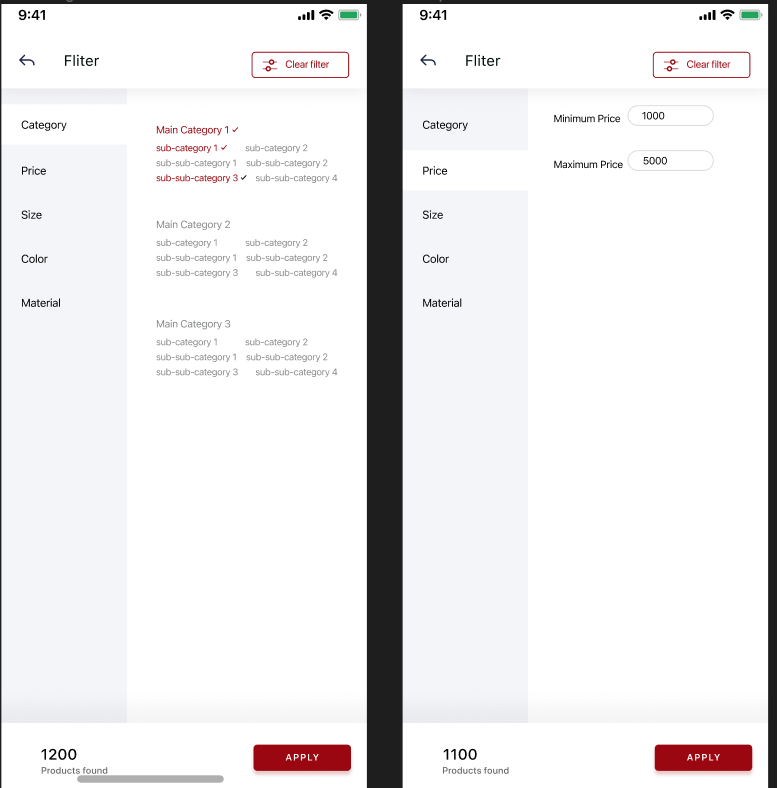
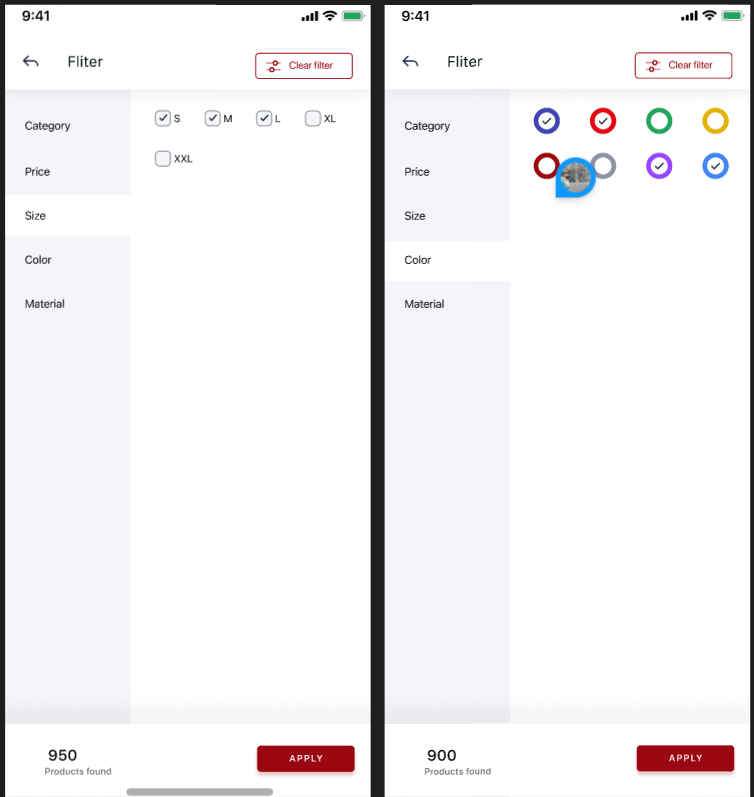
Shop main interface
Shop filter
Shop filter
### Endpoint
* `{{baseurl}}/api/v1/product/get/filter`
### **Method**
* **GET**
### **Request Parameters:**
* `lang_code` (optional): A two-letter language code (e.g., "en" for English, "ar" for Arabic, etc.) to support language-based localization. If provided, the API returns product information and filters in the specified language.
### **Request Body:**
* None
### **Authorization**
The API requires a bearer token in the request header for authentication. Users need to include their valid bearer token in the "Authorization" header of the HTTP request to access the shop.
### **Response Format**
The API responds with a JSON object containing filtered product data based on the user's preferences. The response includes an array of product objects with details such as product ID, name, price, and other product-related information.
```json
{
"success": true,
"data": {
"categoryFilter": [
{
"id": 60,
"name": "DESIGN STICKER'S",
"banner": "https://majarat-developemt.s3.ap-southeast-1.wasabisys.com/uploads/all/504-C.jpg",
"icon": "https://majarat-developemt.s3.ap-southeast-1.wasabisys.com/uploads/all/503-A.jpg",
"children": [
{
"id": 49,
"name": "BABY",
"banner": "https://majarat-developemt.s3.ap-southeast-1.wasabisys.com/uploads/all/504-C.jpg",
"icon": "https://majarat-developemt.s3.ap-southeast-1.wasabisys.com/uploads/all/505-C.jpg",
"children": [
{
"id": 55,
"name": "Cartoons",
"banner": "https://majarat-developemt.s3.ap-southeast-1.wasabisys.com/uploads/all/73ddbcb0672a30b12dee12440507051f.jpg",
"icon": "https://majarat-developemt.s3.ap-southeast-1.wasabisys.com/uploads/all/73ddbcb0672a30b12dee12440507051f.jpg",
"children": []
}
]
},
{
"id": 76,
"name": "LARGE",
"banner": "https://majarat-developemt.s3.ap-southeast-1.wasabisys.com/uploads/all/504-C.jpg",
"icon": "https://majarat-developemt.s3.ap-southeast-1.wasabisys.com/uploads/all/503-A.jpg",
"children": []
}
]
},
{
"id": 61,
"name": "HENNA",
"banner": "https://majarat-developemt.s3.ap-southeast-1.wasabisys.com/uploads/all/502-C.jpg",
"icon": "https://majarat-developemt.s3.ap-southeast-1.wasabisys.com/uploads/all/504-B.jpg",
"children": [
{
"id": 67,
"name": "INSTANT HENNA",
"banner": "https://majarat-developemt.s3.ap-southeast-1.wasabisys.com/uploads/all/502-C.jpg",
"icon": "https://majarat-developemt.s3.ap-southeast-1.wasabisys.com/uploads/all/504-C.jpg",
"children": []
},
{
"id": 68,
"name": "DIP HENNA",
"banner": "https://majarat-developemt.s3.ap-southeast-1.wasabisys.com/uploads/all/505-C.jpg",
"icon": "https://majarat-developemt.s3.ap-southeast-1.wasabisys.com/uploads/all/503-A.jpg",
"children": []
},
{
"id": 70,
"name": "NAIL HENNA",
"banner": "https://majarat-developemt.s3.ap-southeast-1.wasabisys.com/uploads/all/504-C.jpg",
"icon": "https://majarat-developemt.s3.ap-southeast-1.wasabisys.com/uploads/all/505-C.jpg",
"children": []
},
{
"id": 71,
"name": "FRESH HENNA CONE",
"banner": "https://majarat-developemt.s3.ap-southeast-1.wasabisys.com/uploads/all/505-A.jpg",
"icon": "https://majarat-developemt.s3.ap-southeast-1.wasabisys.com/uploads/all/501-B.jpg",
"children": []
},
{
"id": 72,
"name": "NATURAL HENNA POWDER",
"banner": "https://majarat-developemt.s3.ap-southeast-1.wasabisys.com/uploads/all/505-C.jpg",
"icon": "https://majarat-developemt.s3.ap-southeast-1.wasabisys.com/uploads/all/502-C.jpg",
"children": []
}
]
},
{
"id": 50,
"name": "TATTOOS",
"banner": "https://majarat-developemt.s3.ap-southeast-1.wasabisys.com/uploads/all/716999003_max.jpg",
"icon": "https://majarat-developemt.s3.ap-southeast-1.wasabisys.com/uploads/all/716999003_max.jpg",
"children": [
{
"id": 56,
"name": "Full hand Stickers",
"banner": "https://majarat-developemt.s3.ap-southeast-1.wasabisys.com/uploads/all/m3ame_512.webp",
"icon": "https://majarat-developemt.s3.ap-southeast-1.wasabisys.com/uploads/all/m3ame_512.webp",
"children": []
}
]
}
],
"attributes": {
"attributes": [
{
"id": 1,
"name": "Size",
"attribute_value": [
{
"id": 1,
"value": "SMALL"
},
{
"id": 6,
"value": "MEDIUM"
},
{
"id": 10,
"value": "LARGE"
},
{
"id": 11,
"value": "KIDS"
},
{
"id": 12,
"value": "BABY"
},
{
"id": 28,
"value": "X- SMALL"
}
]
},
{
"id": 2,
"name": "Colour",
"attribute_value": [
{
"id": 2,
"value": "#000000"
},
{
"id": 3,
"value": "#ffffff"
},
{
"id": 4,
"value": "#e8179b"
},
{
"id": 5,
"value": "#d5cf1a"
},
{
"id": 7,
"value": "#e75ac9"
},
{
"id": 19,
"value": "#1caf08"
},
{
"id": 22,
"value": "#d38312"
},
{
"id": 23,
"value": "#ff0000"
},
{
"id": 24,
"value": "#cd0a0a"
},
{
"id": 29,
"value": "#7f2f2f"
},
{
"id": 30,
"value": "#7a0505"
}
]
}
]
}
},
"message": "Success",
"status_code": 200
}
```
##
##
## Product count
### Endpoint
* `{{baseurl}}/api/v1/product/filters/count`
### **Method**
* **POST**
### **Request Parameters:**
* None
### **Request Body:**
* None
### **Authorization:**
The API requires a bearer token in the request header for authentication. Users need to include their valid bearer token in the "Authorization" header of the HTTP request to access the filter count.
### **Response Format:**
The API responds with a JSON object containing the count of available product filters. The response includes numerical data for each filter category, such as the count of available brands, sizes, colors, etc.
```json
{
"success": true,
"count": 18,
"message": "Success",
"status_code": 200
}
```
####
##
##
## Product list
### Endpoint
* `{{baseurl}}/api/v1/product/filters/list`
### **Method**
* **POST**
### **Request Parameters:**
* `lang_code` (optional): A two-letter language code (e.g., "en" for English, "ar" for Arabic, etc.) to support language-based localization. If provided, the API returns filter category names and details in the specified language.
* `page` (optional): The page number to retrieve when using pagination. If not specified, the API defaults to the first page.
### **Request Body:**
* `variations` (optional, array): An array of variations to filter products. For example, \["Color", "Size"].
* `categories` (optional, array): An array of category IDs to filter products based on specific categories. For example, \[1, 5, 10].
* `minPrice` (optional, number): The minimum price value to filter products by price range.
* `maxPrice` (optional, number): The maximum price value to filter products by price range.
* `sort` (optional, string): Specifies the sorting order of the products. Possible values are "Popularity", "High to low price", "Low to high price", and "Newest first".
{% code title="For finding most popular product" %}
```
popularity
```
{% endcode %}
{% code title="Show latest added In the first" %}
```
newest_first
```
{% endcode %}
price_high_low
{% code title="Price from Low to High" %}
```
price_low_high
```
{% endcode %}
### **Authorization**
The API requires a bearer token in the request header for authentication. Users need to include their valid bearer token in the "Authorization" header of the HTTP request to access the list of filters.
### **Response Format**
The API responds with a JSON object containing the paginated filter category data. The response includes an array of filter objects for the requested page, along with pagination metadata.
```json
{
"success": true,
"data": {
"products": [
{
"id": 56,
"product_name": "Galaxy Space Temporary Tattoos",
"thumbnail": "https://majarat-developemt.s3.ap-southeast-1.wasabisys.com/uploads/all/71yueCPFbXL._SL1000_.jpg",
"mrp_price": 222,
"offer_price": 111,
"avg_rating": 0,
"total_ratings": 0,
"bundle_product": "no",
"is_wishlisted": "no",
"offer_label": 0
},
{
"id": 68,
"product_name": "Kids' Fun Tattoo Party Pack:",
"thumbnail": "https://majarat-developemt.s3.ap-southeast-1.wasabisys.com/uploads/all/617fBzrxFyL._SL1500_.jpg",
"mrp_price": 100000,
"offer_price": 5000,
"avg_rating": 0,
"total_ratings": 0,
"bundle_product": "yes",
"is_wishlisted": "no",
"offer_label": 0
},
{
"id": 64,
"product_name": "Metallic Gold Temporary Tattoos",
"thumbnail": "https://majarat-developemt.s3.ap-southeast-1.wasabisys.com/uploads/all/71GRLetB7rL._SL1200_.jpg",
"mrp_price": 100000,
"offer_price": 100000,
"avg_rating": 0,
"total_ratings": 0,
"bundle_product": "no",
"is_wishlisted": "no",
"offer_label": 0
}
],
"pagination": {
"total": 18,
"count": 3,
"limit": 15,
"current_page": 2,
"total_pages": 2
}
},
"message": "Success",
"status_code": 200
}
```
### Features:
* The Shop API provides users with access to product listings, filter counts, and filter categories for a seamless shopping experience.
* The `lang_code` parameter allows users to receive product and filter information in their preferred language for a more personalized experience.
* Pagination in the `filters/list` endpoint helps users navigate through multiple pages of filter categories when the data is extensive.
### Usage:
The Shop API is used to display products, filter options, and category-specific information to users while shopping on the e-commerce platform.